Built for Networking.
Made for Business.
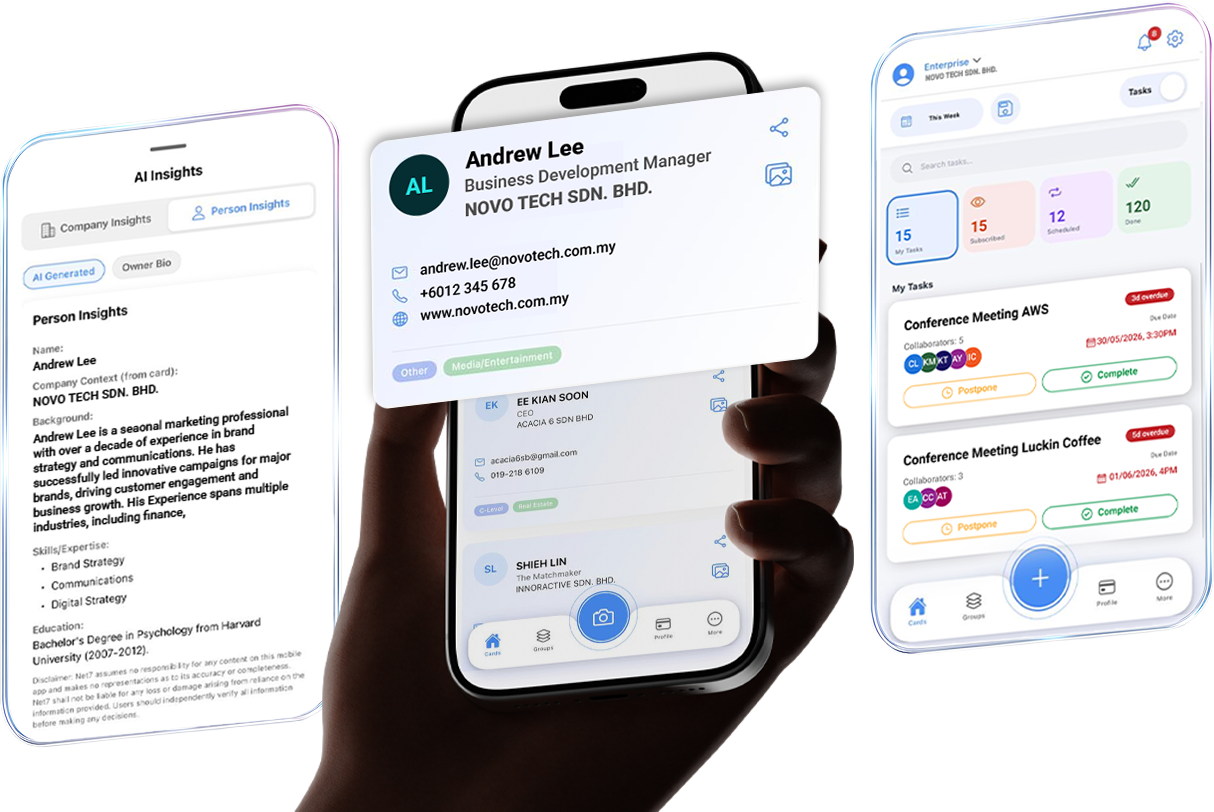
Capture every connection. Automate every follow-up. Multiply your network. Meet the AI engine that helps your team close leads faster.

Digitalise Your Networking in 5 Steps

Scan
Capture full details of business cards with AI-powered OCR capabilities.
Enrich
Add information such as company intel, individual background, etc for a detailed profile. It's more than a name on a card.
Locate
Geotagging features let you record where the card was scanned and locate your contact's company on a map.
Sync
Save time and eliminate manual data entry with secure data flow to your organization's admin portal.
Activate
Monitor progress, assign follow-ups, and close leads with automated reminders to avoid disruptions.
How to Capitalise on Your Networking Data
Reduction in Lost Leads
Instantly scan and capture 100% of business cards into your workflow. When your rep leaves, their network stays and is protected in your company portal.
Faster Onboarding
Replace manual reporting with an intelligent task hub that activates leads instantly. Save hours on weekly status meetings.
AI-Driven Insights
Identify high-value connections before you engage. Walk into every meeting knowing exactly who can move the needle.
Competitive Advantage
Multiply your reach through mutual connections you intend to meet.

Capture and Grow Today
Let's discuss how we can help you build meaningful relationships and achieve success through powerful networking solutions.
You meet people every day but forget most of them.
Without the right tools, it's easy to forget faces, lose context, and miss the chance to follow up.
Get Started
Fill out the form below and we'll get back to you as soon as possible.
Frequently Asked Questions
Getting Started
NET7 is an AI-powered enterprise relationship intelligence platform that helps B2B sales teams map, score, and activate their professional networks. It combines a dynamic People Graph with smart contact management, AI-driven insights, and built-in PDPA compliance tools — so your team can close deals faster through warm introductions rather than cold outreach.
Download the NET7 app from the Apple App Store or Google Play Store. On the login page, tap Register Now to create an account, or tap Continue as Guest to try the basic features without registering.
If you start in Guest mode, you can sign up anytime by going to Settings > Sign Up to save your account and data.
Check your spam or junk folder first. Email verification links are sent from a no-reply address and may be filtered by corporate email security gateways. You can also Resend verification email via the Settings page. If the issue continues, contact your IT administrator to whitelist NET7 sending domains, or reach out to support at hello@net7.biz.
NET7 is available as a mobile app (iOS and Android) and as a web application accessible at app.net7.biz.
What is Space
A Space is a shared place for a specific group to collaborate.
You can use a Space for a team, department, project, customer group, or organization. It brings the relevant people, name cards, and collaboration activities together in one place.
My Overview is your personal place. A Space is a shared place.
My Overview contains the cards you own and cards that have been shared with you. Space is where you choose to share cards and collaborate with a specific group. Your scanned cards stay in My Overview unless you explicitly share them with a Space.
No. Every card you scan goes to My Overview first and remains private to you.
You decide which Space, if any, you want to share the card with. Sharing a card does not move or remove your original card from My Overview.
By default, cards shared in a Space can be seen by the person who shared them and the Space Owner or Admins.
The Space Owner or Admin can change the setting to allow all members to see shared cards. This means joining a Space does not automatically mean you can see every card in it.
Yes. You can have multiple Spaces for different purposes, such as Family, Sales Team, Marketing Team, Project Team, or a customer or business group.
You use the Space switcher to move between them.
A Personal Space is intended for personal or informal use — such as managing your own contacts, networking, side projects, or collaborating with a small group without a formal organizational structure.
An Organization is designed for a company or larger group. It can contain multiple Spaces, such as different departments or teams, while providing a common structure for managing members and billing.
Some Spaces may already have been created based on your existing organization or department structure.
This means your existing teams or departments can be represented as Spaces, so you can start collaborating without having to recreate the structure yourself.
Tap Create, choose what the Space is for, give it a name, and review your settings. Once created, you become the Owner of the Space.
Creating a Space under an Organization is different from creating your own Space. You need to be an Organization Owner or Admin to create another Space under the Organization.
Leaving a Space only removes your access to that Space.
Your own cards in My Overview remain yours. Cards you previously shared with the Space remain there, so the Space can continue using them according to its access settings.
The previous Personal / Enterprise account switch has been replaced by the Space concept.
You now have one account with multiple Spaces. Your personal activities are managed through your Personal Space, while other Spaces can represent teams, projects, departments, or organizations.
Contacts & Features
Open the NET7 mobile app and tap the scan icon. Point your camera at the business card and the app will use OCR (optical character recognition) to extract contact details — name, company, title, phone, and email address. Review the extracted details before saving. If you are on an organization account, the contact will also be added to your workspace upon save.
Ensure the card is well-lit, flat, and fully within the camera frame. Cards with non-standard layouts, decorative fonts, or low-contrast printing may reduce OCR accuracy. After scanning, you can manually correct any field before saving. If a field was missed entirely, you can add it after saving in the contact detail view.
Yes. You can export your personal contacts from the mobile app in CSV or Excel format. Organization owner and admins can export the full organisation contact list subject to their role permissions. Exported data includes all fields stored against each contact record.
Yes. NET7 can be integrated with most major CRM systems. Integration settings are managed by your administrator in the Admin Portal. Contact your administrator or hello@net7.biz for setup assistance.
AI Insights
AI Insights is a dedicated section within each contact record that delivers AI-generated intelligence about the person and their organisation. It is split into two main tabs: Company Insights and Person Insights. Each tab is refreshed automatically and time-stamped so you always know how current the information is.
Company Insights has two sub-tabs. Basic Insights covers the company's profile and latest information available publicly. Financial Insights is available for publicly listed companies and shows a summary of the company's financial performance.
Person Insights displays the AI-generated intelligence profile for that individual. The Owner Bio sub-tab displays a biography curated by that individual where available.
AI Insights are generated from publicly available information and data within your NET7 workspace. All insight cards carry a disclaimer: NET7 assumes no responsibility for the accuracy or completeness of the content and shall not be liable for any loss or damage arising from reliance on it. You should independently verify all information before making decisions based on it.
Insights require sufficient data to generate meaningful output. New contacts with minimal profile data, no interaction history, and no publicly available data may not yet have insights available. Enriching the contact profile and logging at least one interaction will enable the AI engine to generate insights over time. Financial Insights are only generated for publicly listed companies where market data is accessible.
Data Security & PDPA Compliance
Yes. NET7 is designed for full compliance with the Personal Data Protection Act 2010 (PDPA) as amended in 2024. The platform includes a built-in consent management framework, automated first-contact privacy notices, a self-service Privacy Portal for contacts to exercise their rights, and a Compliance Dashboard for your Data Protection Officer. Audit logs are retained for 7 years.
When a contact submits an opt-out request through the Privacy Portal, their opt-out preference is propagated across the entire NET7 system. The contact's status is updated to "Opted Out" and they are excluded from future outreach and data processing beyond what is required by law.
No. The NET7 Privacy Portal is accessible without a login. Contacts receive a personal link in their privacy notice email and can use it to view what data is held, request corrections, submit a marketing opt-out, or request full data deletion — all without creating a NET7 account.
All data in NET7 is encrypted at rest using AES-256 and in transit using TLS 1.3. Role-based access controls are enforced at both the API and database layers. Multi-factor authentication is required for sensitive administrative operations. NET7 maintains a 99.9% uptime SLA and uses immutable, append-only audit logs for all compliance-relevant events.
Active contact and relationship data is retained for as long as your account is active. Consent and compliance audit logs are retained for 7 years as required by PDPA. When a contact requests deletion, their personal data is purged from active systems and only anonymised audit records are retained.
Support
For urgent issues, contact the NET7 support team at hello@net7.biz. For general questions, use the in-app Support section accessible from the settings page. Organization administrators also have access to a dedicated account management contact.
Email hello@net7.biz with a description of the issue or suggestion. Include screenshots where possible. Organization customers can raise requests directly with their account manager.